I migrated all my agents to Grok Bot
How I went from a Mac mini running OpenClaw and Hermes to Grok Bot, and how a small MCP server over Tailscale kept our local family TRMNL dashboard completely private.

Table of contents
I was one of those people who bought a Mac mini back in March. OpenClaw had just come out, everyone was talking about running their own always-on assistant, and I wanted to see what all the fuss was about.
I wasn't starting completely from zero. I had already played around with a NAS and ran a small n8n instance that I tapped into from time to time. Still, when I actually sat down with OpenClaw, I hit a pretty boring wall. It was fun to tinker with, but I couldn't come up with a single use case I would actually keep using every day. For a while, the Mac mini mostly sat there waiting for a real job.
Finding routines worth automating
Things changed once I stopped looking for impressive demos and started paying attention to annoying daily routines.
I started working out last September, and by June I realized I needed to do a much better job watching my nutrition. The meal-tracking app I used was already decent because I could scan barcodes on packaged food. The problem was everything without a barcode: home-cooked meals, lunches out, random snacks.
Funnily enough, AI is pretty good at estimating nutrition from a photo. Better than I am, at least. My tracking app actually had a feature for that, except it was tedious and took way too many manual steps that I just didn't care for.
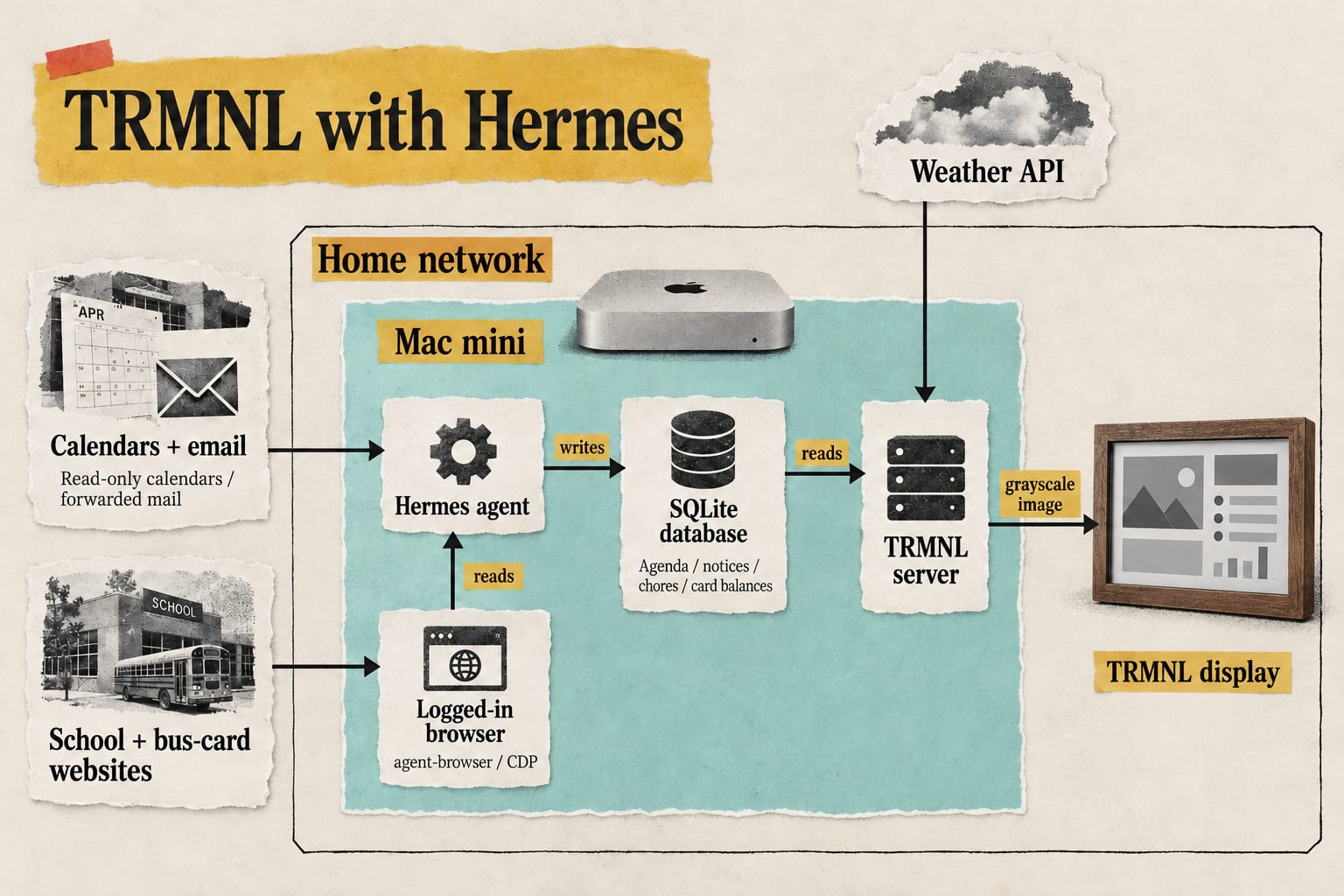
So I set up a Hermes agent on the Mac mini and wired it to Telegram. Whenever I ate something, I'd snap a photo on my phone and send it in chat. On the Mac mini, Hermes would connect to a logged-in browser via agent-browser over CDP (Chrome DevTools Protocol), click through the app, and log the meal for me.
It wasn't glamorous, but I used it every day.
Running a family like a small team
After that worked for a bit, I decided to take things further. I have four kids, and keeping our family organized sometimes takes the coordination skills of a small team. Doctor's appointments, house chores, school announcements, daily schedules, and checking the weather so everyone knows what to wear the next morning.
I set up a TRMNL e-ink tablet in our house and built a custom server for it on the Mac mini. Using TRMNL's BYOS (Bring Your Own Server) protocol, I put together a small TanStack Start web app for the dashboard screens and an Express server that screenshots each page with headless Chrome into a grayscale PNG before serving it to the device.
Everything ran on the Mac mini, completely closed off from the internet. You could only reach it at home or through my Tailscale VPN.
Keeping the screens up to date took a mix of data sources:
- API calls for weather, clothing suggestions, and sunrise/sunset times
- A dedicated email address where we shared read-only calendar access and forwarded school emails
- Browser automations for the less friendly stuff, like checking the remaining credit on my son's bus card and scraping updates from the school info page
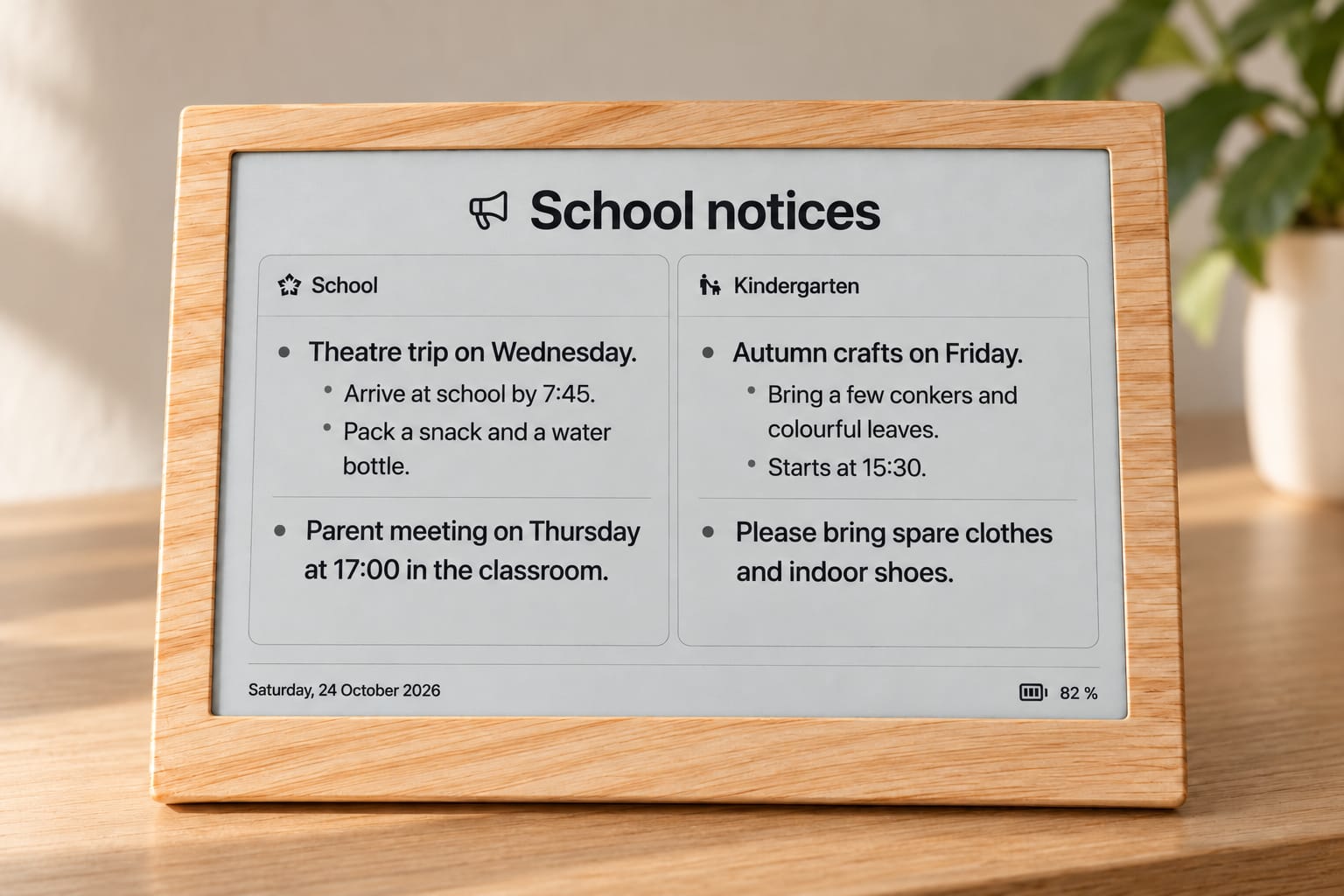
Because I wanted all of that information to stay structured, I put a small SQLite database in the middle using Node's built-in node:sqlite. All those sources fed into tables like todos, calendar_entries, school_announcements, schedule_entries, and info_items. The TRMNL app just read from SQLite and rendered the screens.
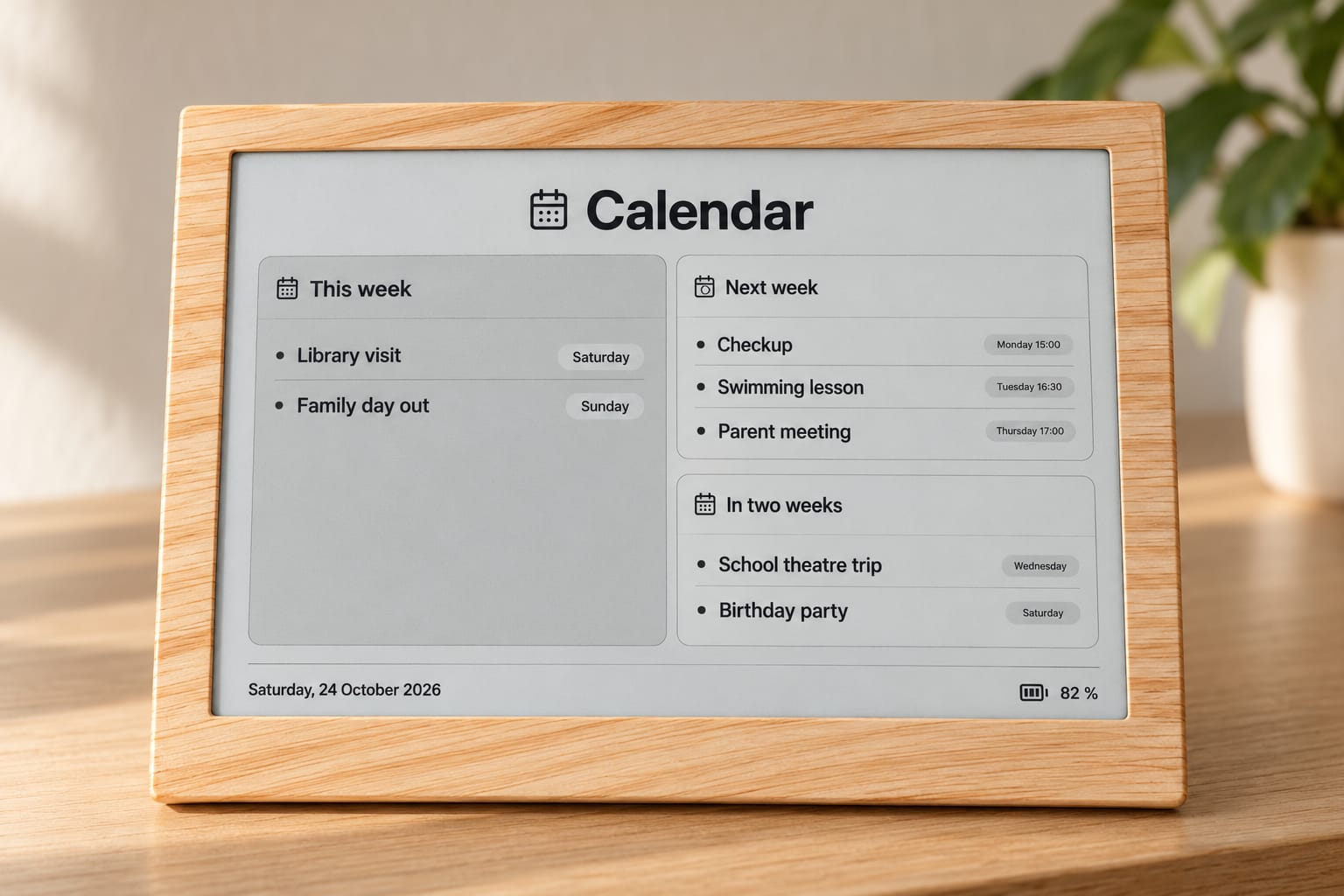
And it worked most of the time.
The babysitting problem
"Most of the time" gets old faster than you'd think.
Sometimes an automation needed a small nudge. Sometimes Telegram sent me an error message and I had to SSH into the Mac mini to debug what broke. The worst part was when things failed silently and I only noticed a few days later because the wall display still showed last week's appointments.
I tried a few other automations around that time too, like intelligently cross-posting my X posts to Bluesky, and they didn't work great either.
I had bigger ideas on my list, like keeping my company expenses synced to the accounting software I use. Hermes was already doing quite a lot, but it felt like it needed constant babysitting. Between the flaky runs and the silent failures, I just didn't feel like I could trust it with anything more important.
Even so, there was one thing I really loved about that setup. Everything was sealed inside my VPN, living on a Mac mini in my own house. Family schedules, school info, and chores stayed in the family. I never put the app on Cloudflare or out on the public internet, because having that Mac mini at home felt good. It finally felt like it had a purpose.
Giving Grok Bot a real try
When Grok Bot came out, I didn't pay much attention at first. Then I saw Claire Vo mention that she had migrated everything over to Grok Bot. Soon after, Debbie O'Brien started publishing all kinds of videos and blog posts about it, and that got me curious enough to actually try it.
I liked it almost immediately. The biggest first impression was that it felt like a real product, whereas Hermes always had a very DIY feel.
I started testing a few small use cases, and before long I was going further than I ever had with Hermes. I was hooked.
One thing caught me by surprise. Grok Bot actually shows less information than Hermes, yet somehow feels more transparent. Hermes would often dump a wall of Python code and intermediate decisions on screen, and even while looking right at it, I wasn't always sure what it was actually doing. Getting asked for permission right before it executed a wall of generated script definitely felt weird. With Grok Bot, I had a much clearer sense of what was about to happen without having to read through a pile of code every single time.
Moving my workflows over
Once I got comfortable, the migration moved quickly.
I set up a nutrition bot and a social repost bot, then started automating a few work workflows I had been putting off. I also began using it for one-off real-life errands. I needed to find handymen to repair a few things around the house, so I asked Grok Bot to handle the legwork. It sent out requests, collected quotes, and narrowed everything down to a shortlist of the best options. That alone saved me hours I really didn't want to spend chasing replies.
At that point, I felt ready to move most of my stuff over. There was just one problem left.
Keeping the family dashboard local with MCP and Tailscale
The family TRMNL tablet relied on a local SQLite database sitting on the Mac mini, and switching agents wasn't going to convince me to put our family data on the public internet.
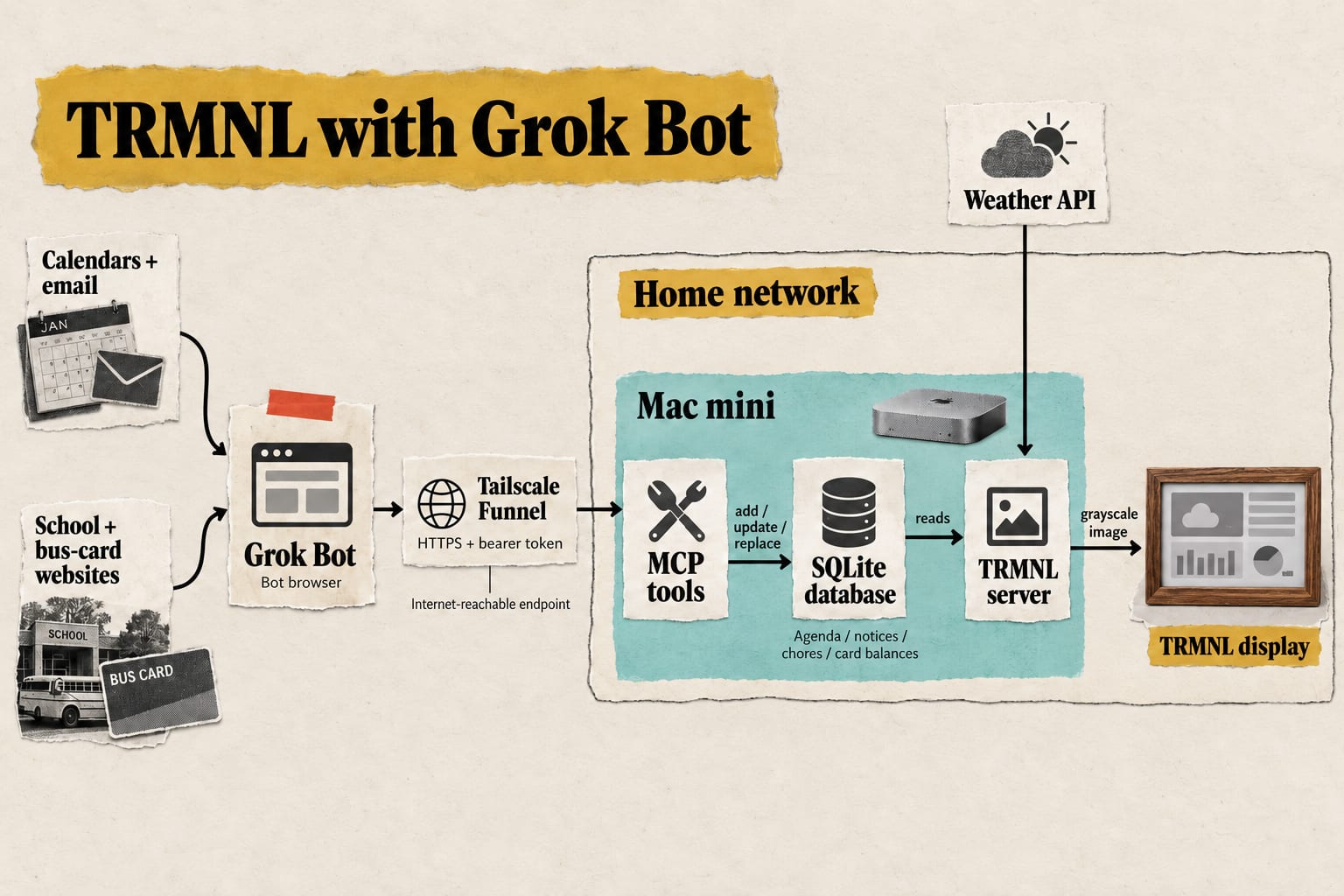
Turns out I didn't have to. Grok Bot supports Tailscale, which means it can join my tailnet and connect directly to an MCP server running on the Mac mini.
So instead of moving the database to the cloud, I added a small MCP server right inside the existing Express device server and mounted it at /mcp. It reads and writes the exact same SQLite database that feeds the TRMNL screens, protected by a bearer token and kept on the tailnet.
Here is a simplified look at how a few of those tools are registered:
A few small design choices made the MCP layer much more reliable than my old scripts:
- Every write has a matching read tool (
list_todos,list_calendar_entries,list_school_announcements,list_info_items), so Grok Bot can check what is already on the display before adding anything and avoid duplicates. - Daily refreshes are atomic.
replace_calendar_entriesswaps all three weekly buckets (this_week,next_week,two_weeks) inside a single SQLite transaction. If input validation fails or a write errors out, the previous agenda stays intact instead of leaving the tablet half-empty. - Changing stats like a bus card balance use
upsert_info_itemwith a stable key, so updating a number refreshes the card in place rather than stacking a new one every morning. - The
/mcproute checks a bearer token with constant-time comparison and returns503if no token is configured, so it fails closed after a restart.
Grok Bot connects over Tailscale, calls those tools, and keeps the database filled in.
Same Mac mini, better setup
What I like most about how this turned out is how little had to change on the home server itself.
The TRMNL tablet still polls the exact same Express server. The dashboard still reads from the exact same SQLite file. Our family data still stays off the public internet. All I added was a thin set of MCP tools on top of the database so Grok Bot could manage the content cleanly.
A few days after moving the last workflow over, I SSH'd into the Mac mini and ran hermes uninstall. The Mac mini still sits at home doing its job, just with a lot less babysitting.